
Waldorf University Student Portal Transition Information
Direct Link: https://wauportal.jenzabarcloud.com/ICS/
DNS TRANSITION IN PROGRESS
MyWaldorf Student Portal updates in progress. We’re waiting for our DNS changes to take effect. One changes are final this page will be automatically redirected.
From 9/11/2026 through 10/19/2026 the MyWaldorf Student Portal will be inaccessible due to the transition to a new Student Information System.
DIRECT COURSE ACCESS: online.waldorf.edu
When the portal returns, it will be hosted on a new platform. The layout will be different and some functionality will be available ahead of others.
Below is a playlist from Jenzabar, the software provider, that outlines some of the things to expect with the new portal design. Please note, however, that the views shown are generic and may be different from Waldorf’s custom portal build-out.
https://www.youtube.com/playlist?list=PL6qAKxnxDmQnZsJh-mlPraA4YWWLuAUEM
Below you will find temporary resources and functionality. Please note that while we will receive your request through the form submission, several functions will be delayed until we go-live in our new system.
Temporary Portal Functions Replacements
-
To access your courses, visit online.waldorf.edu.
-
To request a drop or to withdraw from a course, please complete the form, here.
-
To enroll in 2B27, please call or email your Student Services Representative or Academic Advisor who can submit the enrollment on your behalf. Some processing may be delayed due to the transition, but we will ensure your registration for your desired courses.
-
To submit a complaint or appeal, email or call your Student Services Representative.
-
You can order official transcripts through Parchment, as normal.
-
You will retain access to support for your courses through Tutor.com. For additional academic support, you can always reach out to your advisor.
-
To request education verification, email assistant.registrar@waldorf.edu.
-
To petition to graduate, complete this form.
-
To change your program and get re-evaluated, complete this form.
-
To request an Associate Degree as a Bachelor's student, complete this form.
-
Complete and submit this form if you are enrolled in a degree program and wish to transfer courses into a corresponding certificate program.
Support Services
-
Acacedmic Achievement Center
Online Disability Accommodations
The Academic Achievement Center (AAC) provides academic services to all Waldorf University Students.Waldorf University Online Students have access to the following services: Disability Accommodations
Contact us to discuss how we can help you today:
- Phone
- Call us at (800) 292-1903
- Send an email to AAC@waldorf.edu to have someone contact you.
-
- Accomodation Request
-
Click here to fill out the Initial Accommodation Request
Requesting Accommodations
Waldorf University online students who would like to request academic accommodations for a disability will need to contact the Disabilities Specialist and provide appropriate documentation of their disability at least two weeks prior to their course start date.
Appropriate documentation will include a diagnosis of the disability, testing results and the impact of the disability on the student in the online learning environment. The university is required by law to have current documentation of the disability in order to provide accommodations. Typically academic testing results are required to be within the last three years. (The timeframe of testing for certain disabilities can be more or less frequent based on the area of disability and the possibility of a change in the disability or condition pertaining to student need and the requirements of our office.)
Insufficient or incomplete documentation can result in the following until appropriate documentation is received:
- a delay in your accommodations
- the implementation of limited accommodations
- the implementation of temporary accommodations
Accommodations Agreement
Once our office receives your accommodations request and documentation you will be contacted by one of our Disability Specialists to finalize your accommodations. After communicating your needs with the disability specialist an accommodations agreement form will be signed by both parties and placed in your confidential file. Complete your Initial Accommodations Request here.
Notification to Professors
You will need to make an accommodation request each term indicating which course(s) that you want to utilize your accommodations. We only notify your professors of the academic accommodations they need to be aware of for your participation in their class and not the area of your disability. It is your individual choice if you choose to disclose your disability area to your professor. You will be provided with a copy of the letter outlining your accommodations to the professor. You are responsible for requesting accommodations through our office in a timely manner so that our office will have ample time to provide your accommodations and to notify your professor(s).
-
Waldorf Merchandise
In the Waldorf University Bookstore you can shop 24/7 for latest WU gear! Polos, sweatshirts, T-shirts and other apparel are available in a variety of sizes, styles and colors.
Click here to shop the Online Store. -
Office of the Registrar
We are here to support you throughout your time at Waldorf University and look forward to helping you reach your educational goals. In this office we evaluate your past education, military, and professional experience to maximize transfer credit.
Once you’ve completed your degree requirements we will then make sure you’re ready to graduate! The Office of the Registrar processes incoming transcripts from other institutions and we also handle your requests for WU transcripts. We assist students with changing programs of study, Commencement, and many other needs our students may have.
Your Academic Advisor will help guide you through your degree program from beginning to end by assisting with:
- ongoing and regular advising sessions
- course selection
- degree program inquiries
- course sequencing
- course load
- making sound academic decisions
- resolving issues
Your Academic Advisor’s goal is to establish a solid relationship with you that is built on mutual respect, trust, and open communication. Your Academic Advisor will encourage you to identify personal strengths and weaknesses so that you can reach your full potential as a successful college student by listening and empowering you to make the right choices about your education and future.
We are happy to have you as a member of the Waldorf University student body and look forward to assisting you from start to finish.
Contact us to discuss how we can help you today:
- Phone: (877) 267-2157
- Email: Advising@waldorf.edu
- Email: associate.registrar@waldorf.edu
-
Student Accounts
The role of Student Accounts is to serve as point of contact for your account inquiries. Student Accounts manages your student account to ensure that your enrollments are processed and that your account is current.
Student Accounts Specialists are responsible for processing online requests submitted for:
- Online Payments
- Receipts
- Corporate Billing
- Payment Plans
Contact Us
- Phone
- Call us at (877) 267-2157 to talk to a friendly specialist today!
- Send an email to accounting@waldorf.edu to have someone contact you.
Online Payments
Payments made online for tuition, fees, or other expenses to Waldorf University.
Contact us to discuss how we can help you today:
- Phone
- Call us at (877) 267-2157
- Send an email to accounting@waldorf.edu to have someone contact you.
Receipt
Contact us for a detailed statement listing courses, tuition, and payment method.
Contact us to discuss how we can help you today:
- Phone
- Call us at (877) 267-2157
- Send an email to accounting@waldorf.edu to have someone contact you.
Corporate Billing
Tuition paid directly to Waldorf University by an organization or employer.
Contact us to discuss how we can help you today:
- Phone
- Call us at (877) 267-2157
- Send an email to accounting@waldorf.edu to have someone contact you.
Payment Plans
Waldorf University offers flexible payment options. Contact us with inquiries.
Contact us to discuss how we can help you today:
- Phone
- Call us at (877) 267-2157
- Send an email to accounting@waldorf.edu to have someone contact you.
Please note that general Financial Aid inquiries should be directed to our Financial Aid Representatives.
-
About
The role of Student Services is to serve as point of contact for general student inquiries. Specialists are able to provide assistance with a wide range of questions related to Waldorf policies, courses, graduation, and much more. Student Services Specialists are available to assist you via telephone, email, and chat.
Student Services Representatives work diligently to ensure that you remain enrolled throughout your educational career. Waldorf understands that sometimes submitting an enrollment is not your first priority, so this group is here to offer a reminder that an enrollment is needed to keep your degree plan on track.
Student Services Specialists are responsible for processing online requests submitted for:
- Final Exams
- Proctors
- Incomplete Course Requests
- Incomplete Course Request
- Incomplete for Special Circumstances
Contact Us
- Phone
- Call us at (877) 267-2157 ext. 6534to talk to a friendly specialist today!
- Send an email to students@waldorf.edu to have someone contact you.
Frequently Asked Questions
- 1) Can Discussion Boards be submitted late?
- No. Discussion Boards require active participation and cannot be submitted after the original deadline.
- 2) Does Waldorf University offer any scholarships?
- Yes. You may learn more about Scholarship opportunities here.
- 3) Does Waldorf University offer any tuition discounts?
- Yes. Waldorf University partners with numerous companies, municipalities and organizations around the world to offer a special discounted tuition rate through our Learning Partner program. If you are a member of one of our Learning Partners you, your spouse and your children will receive a 10% tuition discount and exclusive scholarship opportunities.
- 4) Does Waldorf University offer Disability Services and Accommodations?
- Yes. You may learn more about the services offered here.
- 5) English is not my first language. Do you have any services to assist me with my writing?
- Yes. We offer services to English Language Learners through Tutor.com. You can explore Tutor.com here.
- 6) How can I view my assignment feedback?
-
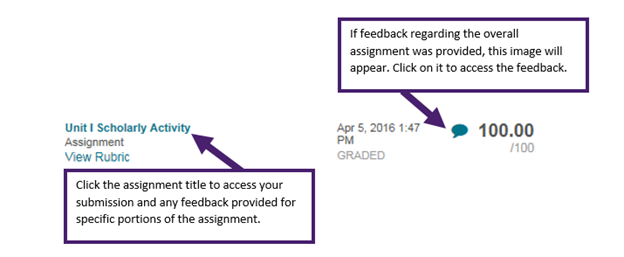
There are two types of feedback. You can find feedback regarding overall assignment by clicking on the feedback bubble (see below). To find feedback specific to certain portions of the assignment, please click on the title of the assignment, followed by the highlighted grade. This will direct you to the assignment and feedback provided (see below).
- 7) How do I change my degree program or concentration?
- Please submit the Program Change/Re-Evaluation Request form and select “Concentration Change” or “Change Degree Program” under the Student Intent field. There is a fee associated with either request.
- 8) How do I request additional time in my course?
- The request must be submitted by 11:59 pm CST of your course end date for consideration and all requests are subject to the professor’s approval. We have two request options, the Incomplete Course Request and the Incomplete Course Request for Special Circumstances. The Incomplete Course Request has a fee associated with it; whereas, the Incomplete Course Request for Special Circumstances requires support documentation of extenuating circumstances. We strongly advise that assignment due dates be spaced out one week apart from one another. Students must adhere to the approved dates. Please be aware that an Incomplete Course may affect one’s continuous enrollment and Financial Aid.
- 9) How do I request my Final Exam?
- If your course includes a final exam, please submit the Request to take Final Exam Online form if you are using a live proctor. This will prompt Student Services to send your Final Exam information to your proctor. It is the student’s responsibility to schedule a mutual testing time and place with their proctor. If you are using Honorlock as your proctor, you DO NOT need to submit the Request to take Final Exam form. Please only submit this form if you are using a live proctor.
- 10) How do I set up a proctor?
- To submit information for a potential proctor, please complete the Proctor Agreement Form. Please send the Proctor Agreement Form and a form of certification to Student Services for consideration either by email to students@waldorf.edu or fax to 251.224.0569. Please refer to our Final Examination Proctor Policy in the University Catalog to learn more about our proctored Final Exams and acceptable proctors.
- 11) How do I submit a transcript or professional training for consideration of transfer credit?
- If you have a transcript or professional training that has not been previously evaluated for transfer credit, please submit the Program Change/Re-Evaluation Request form and select “Course Transfer Request” under the Student Intent field. Transcripts or professional training can be sent to our Registrar’s Office via email or fax 251-224-0554.
- 12) How do I verify submission of my assignment?
-
You can verify successful submission of an assignment by going to the “My Grades” section of Blackboard. This is located in two places: 1) Under “Tools” on the left hand side of the Blackboard home page and 2) in the course within the purple course navigation menu on the left hand side of the screen. The assignment will show as “Submitted” or “Needs Grading” if it was successfully submitted. Please see the example below.

- 13) I recently graduated with Waldorf University. How do I begin a new program?
- Congratulations on successfully completing your first program! To begin a new program, please Re-Apply to select your degree program and begin the evaluation process. Once you receive your evaluation and Degree Advisement Plan, you may submit an enrollment.
- 14) May I appeal a grade?
- Yes. Please review our Grade Appeal Policy in the University Catalog.
- 15) What if I do not receive a response from my professor?
- Professors are allotted 48 hours to respond to all emails. If more than 48 hours has passed since you emailed your professor, please contact Student Services at 877-267-2157 ext. 6534 or students@waldorf.edu.
- 16) What is an Academic Integrity Violation (AIV)?
- Please read the Grading Procedures Policy in the University Catalog to learn more about Academic Integrity Violations.
- 17) What is Honorlock?
- Honorlock is an on-demand, third-party, virtual proctor which allows students to sit for an examination anytime, anywhere through use of video technology. Students choosing Honorlock must have an operational webcam/video with audio, a high-speed internet connection, and appropriate system rights required to download and install software. The Honorlock Google Chrome Extension is required. During examination administration, Honorlock will access the student’s webcam and microphone to record the examination for academic integrity review. There is a $20 fee to use Honorlock for remote proctoring. This is a fee for this third-party service provider, due to Honorlock, and not received in any way by Waldorf University.
- 18) Who is my Student Service Representative?
- You may locate your Student Service Representative’s contact information on the My Account page.
- 19) How can I view my assessment feedback?
-
There are two types of feedback. You can find feedback regarding an overall assessment by clicking on the feedback bubble (see below). To find feedback specific to certain portions of the assessment, please click on the title of the assessment. This will direct you to the assessment and any feedback provided.
-
Career Center
The Career Center at Waldorf University is available to all current students and alumni. We are happy to assist with career exploration, resume and cover letter writing, job searches, interview preparation and graduate school information.
The Career Center is open Monday through Friday 8 a.m. - noon, and 1 - 5 p.m. CST.
You can get connected with us through Facebook! “Like” our page. You’ll get the following information in your newsfeed:
- job postings
- information about career-related events on and off campus
- tips for resumes and cover letters
- professional networking and interviewing
- and much more!
Check out our website for:
- information on exploring academic majors and careers
- resources you can use when searching for employment
- including a link called Job Search for Graduates where we post current job openings
- graduate school information
Contact us to discuss how we can help you today:
- Phone
- Call us at (641) 585-8681
- Send an email to careers@waldorf.edu to have someone contact you.
-
Technical Support
To speak with Technical Support, please call (641) 585-8150. You may also contact us via email at techsupport@waldorf.edu or via Live Chat.
Hours of Availability
Current hours of operation:
Monday – Friday 8:00 AM – 5:00 PM Saturday Closed Sunday Closed
(If contacting us by phone during weekends, please leave a voice message and we will return your call promptly.)
Blackboard Help Desk
For Blackboard related errors, please call (833) 506-3438.
-
- Abstract External link opens in a new tab or window.
- Annotated Bibliography - Thesis External link opens in a new tab or window.
- Annotated Bibliography - Topic Overview External link opens in a new tab or window.
- Appendix - Multiple External link opens in a new tab or window.
- Appendix - single with One Figure External link opens in a new tab or window.
- Business Letter External link opens in a new tab or window.
- Cover Page External link opens in a new tab or window.
- Illustration Essay External link opens in a new tab or window.
- Informal Essay External link opens in a new tab or window.
- Literature Review - Complete Essay External link opens in a new tab or window.
- Literature Review - ProCon External link opens in a new tab or window.
- Outline - Multilevel External link opens in a new tab or window.
- Proposal & Thesis External link opens in a new tab or window.
- Reference Page External link opens in a new tab or window.
- Research Paper - ToC & Abstract External link opens in a new tab or window.
- Twin Sources External link opens in a new tab or window.
- Writing Center Feedback External link opens in a new tab or window.
- Essay Writing Quick Tips External link opens in a new tab or window.
- Essay Writing Tips External link opens in a new tab or window.
- Google Docs Access Information Waldorf 7 External link opens in a new tab or window.
- How to Interpret Your SafeAssign Report Waldorf External link opens in a new tab or window.
- Interpreting SafeAssign Waldorf External link opens in a new tab or window.
- Legal Citations 7th Ed Waldorf External link opens in a new tab or window.
- Online Image Guide 7th ed Waldorf External link opens in a new tab or window.
- PowerPoint Example External link opens in a new tab or window.
- SafeAssign Originality Checker External link opens in a new tab or window.
- Blog Comment Waldorf - 7th Edition Link opens a PDF file.
Blog Comment Waldorf - Blog Post Waldorf - 7th Edition Link opens a PDF file.
Blog Post Waldorf - Book Chapter Waldorf - 7th Edition Link opens a PDF file.
Book Chapter Waldorf - Book Waldorf - 7th Edition Link opens a PDF file.
Book Waldorf - Citation Guide - 7th Edition External link opens in a new tab or window.
This tutorial is a companion to the Citation Guide. It walks you through the Citation Guide and explains what the guide is and how to use it. - Court Case Waldorf - 7th Edition Link opens a PDF file.
Court Case Waldorf - Dictionary Source Waldorf - 7th Edition Link opens a PDF file.
Dictionary Source Waldorf - E-book Waldorf - 7th Edition Link opens a PDF file.
E-book Waldorf - E-Textbook Waldorf - 7th Edition Link opens a PDF file.
Waldorf E-Textbook Reference Guide - Government Report no author Waldorf - 7th Edition Link opens a PDF file.
Government Report no author Waldorf - Government Report Waldorf - 7th Edition Link opens a PDF file.
Government Report Waldorf - Journal – Paper Copy Waldorf - 7th Edition Link opens a PDF file.
Journal – Paper Copy Waldorf - Journal from Database Waldorf - 7th Edition Link opens a PDF file.
Journal from Database Waldorf - Magazine Article Waldorf - 7th Edition Link opens a PDF file.
Magazine Article Waldorf - Newspaper Article Waldorf - 7th Edition Link opens a PDF file.
Newspaper Article Waldorf - Online Journal Without Vol. Iss. P. Waldorf - 7th Edition Link opens a PDF file.
Online Journal Without Vol. Iss. P. Waldorf - Online Magazine Waldorf - 7th Edition Link opens a PDF file.
Online Magazine Waldorf - Online Magazine without Author Waldorf - 7th Edition Link opens a PDF file.
Online Magazine without Author Waldorf - Online Map Directions Waldorf - 7th Edition Link opens a PDF file.
Online Map Directions Waldorf - Online Newspaper Waldorf - 7th Edition Link opens a PDF file.
Online Newspaper Waldorf - Study Guide Waldorf - 7th Edition Link opens a PDF file.
Study Guide Waldorf - Webpage Waldorf - 7th Edition Link opens a PDF file.
Webpage Waldorf - Webpage with Corp or Govt Author Waldorf - 7th Edition Link opens a PDF file.
Webpage with Corp or Govt Author Waldorf
-
- Active and Passive Voice External link opens in a new tab or window.
- Adjectives External link opens in a new tab or window.
- Adverbs External link opens in a new tab or window.
- Capitalization External link opens in a new tab or window.
- Conjunctions External link opens in a new tab or window.
- FANBOYS Coordinating Conjunctions External link opens in a new tab or window.
- Fragments External link opens in a new tab or window.
- Italics, quotation marks, and capitalization in titles External link opens in a new tab or window.
- Nouns External link opens in a new tab or window.
- Parallelism External link opens in a new tab or window.
- Prepositions External link opens in a new tab or window.
- Punctuation - Commas External link opens in a new tab or window.
- Punctuation - Dashes, Hyphens, Colons, Semicolons External link opens in a new tab or window.
- Punctuation Basics External link opens in a new tab or window.
- Run-on Sentences External link opens in a new tab or window.
- Sentence Fundamentals
-
- Being a Healthy Student External link opens in a new tab or window.
- Internet Tips and Tricks External link opens in a new tab or window.
- Productivity External link opens in a new tab or window.
- Relaxation Techniques External link opens in a new tab or window.
- Stress Management External link opens in a new tab or window.
- Success Guide for Online Learning External link opens in a new tab or window.
This tutorial walks you through the Success Guide for Online Learning to explain what it is and how to use it. - How to use your eTextbook
-
- Abstracts External link opens in a new tab or window.
- Annotated Bibliography External link opens in a new tab or window.
- Argumentative Essays External link opens in a new tab or window.
- Argumentative Thesis Statement External link opens in a new tab or window.
- Article Critiques External link opens in a new tab or window.
- Basic Thesis Statements External link opens in a new tab or window.
- Essay Writing External link opens in a new tab or window.
- First and Second Person External link opens in a new tab or window.
- Integrating Literary Sources External link opens in a new tab or window.
- Introductions and Conclusions External link opens in a new tab or window.
- Outlines External link opens in a new tab or window.
- PowerPoint Basics External link opens in a new tab or window.
- Editing and proofreading External link opens in a new tab or window.
- Research Paper Writing